

For gyms, studios and clubs
A membership card your members always have with them
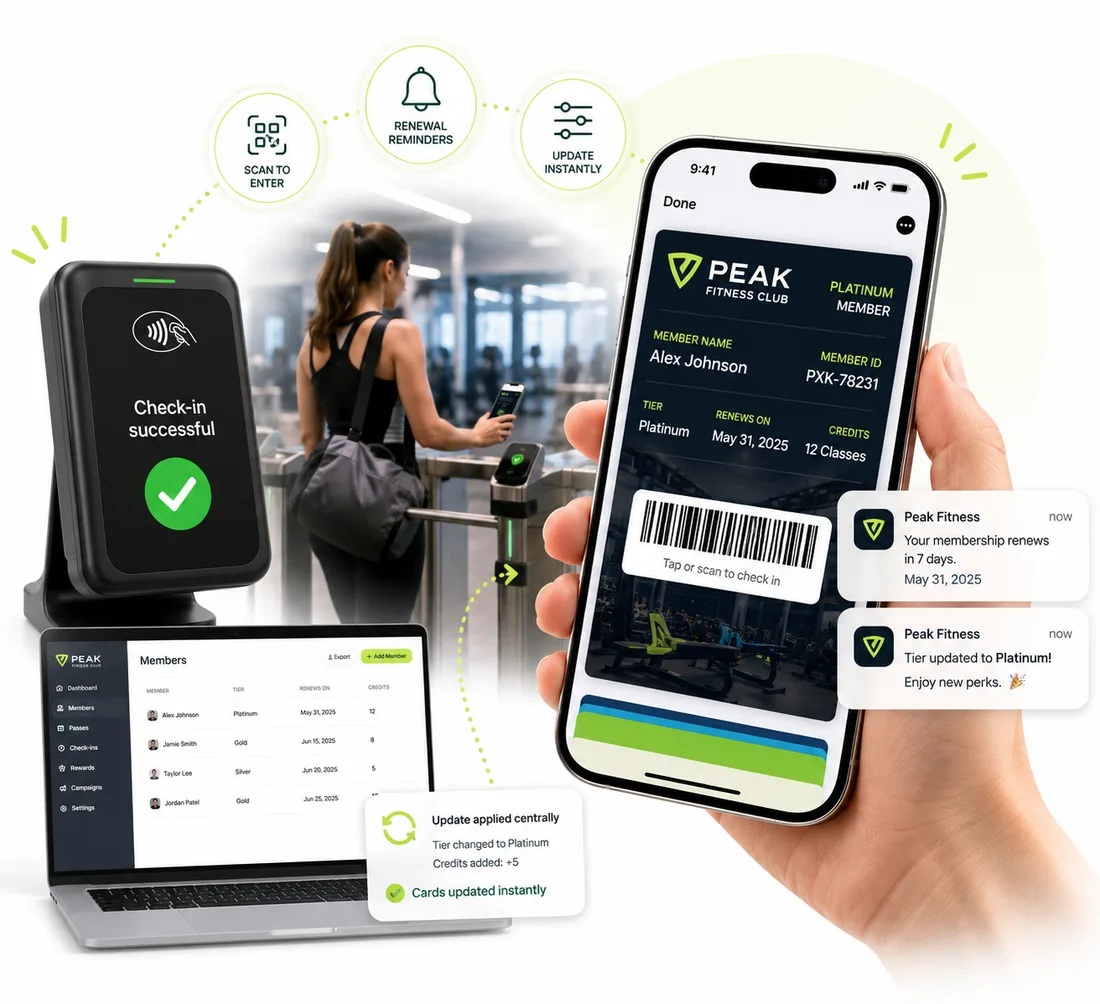
Replace plastic key tags with a membership pass in Apple Wallet or Google Wallet. It carries a QR code or barcode for your door reader, and it updates on the phone whenever you change it. No app to download.
New accounts get free pass credits to start.
Why key tags and paper cards fall short
Members forget them
Fobs and cards get left in gym bags and cars. The phone is always with them.
Reissuing is slow
A new tier or expiry date means printing a new card. A wallet pass is edited once and updates on every member's phone.
Lapses happen quietly
Members drift away without a nudge. Set an expiry on the pass and notify them before it runs out.
How it works
Live in three steps
Design the membership pass
Start from a membership template, add your logo and colors, and choose the fields to show, such as member name, member ID, tier and valid-till date.
Issue it to members
Upload your member list as a CSV to create a personalized pass for everyone at once. Or point your signup form or checkout at the pass's webhook URL to create one for each new member automatically.
Keep it current
Change a tier or expiry date and the saved pass updates on the member's phone. Send a renewal reminder or a class announcement to their lock screen.
Features
Built for the way memberships actually run
One design, a pass per member
Add variables like {name} or {tier} to any field and each member gets their own version, all from a single design.
A QR code or barcode
Show the member ID as a QR code or barcode, so the reader or check-in app you already use at the door can scan it.
Bulk import
Upload a CSV of your members to create every personalized pass in one go, or add members one at a time.
Passes for new members, automatically
Point a signup form, checkout or booking tool at your pass's webhook URL and each new member gets a pass without anyone lifting a finger.
Renewal reminders and updates
Notify members before their pass expires, or send a custom or scheduled message about class changes and holiday hours.
Each member's own expiry date
Take each member's expiry date from your member list, so a lapsed membership shows as expired in the wallet and at the door. Turn on single-save to stop one link being added to many phones.
Passes gyms start with
Pick a template, swap in your logo and colors, and publish. Each one works in Apple Wallet and Google Wallet.
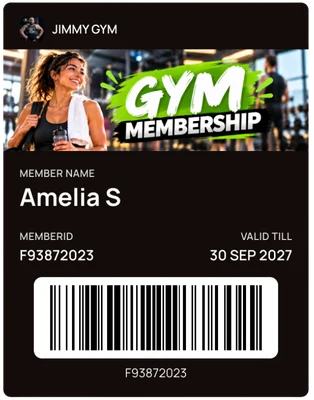
Membership card
A member card with a name, ID and valid-till date.
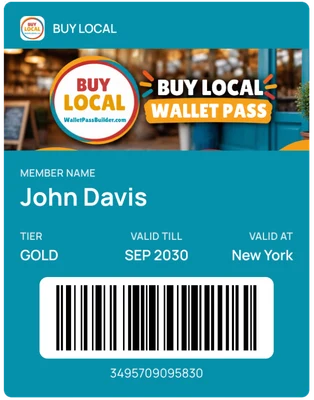
Tiered membership
A membership that shows the member's tier and where it's valid.
FAQ
Questions gyms ask us
How do I replace plastic gym key tags with Apple Wallet or Google Wallet passes?+
Design one membership pass with your logo, put each member's ID in its QR code or barcode, then upload your member list as a CSV. Every member gets a link to add their own pass to Apple Wallet or Google Wallet, and they show it at the door instead of a key tag.
Can I create Apple Wallet gym passes with membership tiers and scannable member IDs?+
Yes. Add fields like {tier} and {member_id} to the design and each member's pass shows their own tier, with their ID in a QR code or barcode. The same pass works in Google Wallet.
Can each member get their own QR code access card?+
Yes. Each member's pass carries their own code, so your reader or check-in system can tell members apart. Change a member's details later and the pass on their phone updates.
How do members check in with a digital barcode instead of a physical card?+
They open the pass in their phone's wallet and scan it at the door. Use the scanner you already have, our free scanner app on Android, or the scanner in the browser on any phone. It shows whether the membership is valid or expired.
Does it work with gym software like Mindbody, PushPress or ABC Fitness?+
Keep your gym software for billing and bookings, and use WalletPassBuilder for the wallet pass. Export your members as a CSV to create passes in bulk, or, if your software connects to Zapier or can send a webhook, a pass is created for each new member automatically.
Do my customers need to download an app?+
No. The pass is saved straight into Apple Wallet on iPhone or Google Wallet on Android, using the wallet app that's already on their phone.
Will the pass work with my door scanner or check-in system?+
Each pass carries a QR code or a barcode, so a reader that scans that code type can read it. Check that your reader supports the format you pick.
How do I update a member's tier or expiry date?+
Update the member's details and the pass saved on their phone updates. Members don't need to do anything.
Can each member's pass expire on their own renewal date?+
Yes. Add a valid_until column to your member list and choose "Each person's own date" for the pass's expiry. Each pass expires on that member's date, and when they renew you change the date and the pass on their phone is valid again.
Can I remind members before their membership ends?+
Yes. Turn on the reminder before expiry, and each member's wallet brings their pass up about two days before their own expiry date. You can also send a custom or scheduled notification at any time.
Can I create passes for my whole member list at once?+
Yes. Upload a CSV to create a personalized pass for everyone on your list, or add rows one at a time.
Can a pass be created automatically when someone joins?+
Yes. Point a signup form, checkout or booking tool at your pass's webhook URL to create or update a personalized pass as people sign up.
How much does it cost?+
One plan with every feature: $49 a month or $490 a year, with 1,000 pass credits included. New accounts get free pass credits to try it out.
Guides
Learn more
Everything our membership cards do, in one place: digital membership card software
- How to make QR code membership cardsCreate digital membership cards with a QR code that members keep in Apple Wallet or Google Wallet: what to include, scanning at the door, and updating cards.
- Loyalty card vs membership card: the differenceA loyalty card rewards repeat customers; a membership card proves someone belongs. How the two differ, where they overlap, and which one your business needs.
- Club membership cards: going digitalHow sports clubs, associations and fan clubs can swap plastic member cards for digital ones in Apple Wallet and Google Wallet: content, renewals and check-in.
More use cases
See how other businesses use wallet passes
- Restaurants and cafes
- Events
- Retail and boutiques
- Associations and clubs
- Creators and professionals
- Salons and spas
- Schools and nonprofits
- Gift cards
Designing your first pass? Read the Apple Wallet and Google Wallet best practices guide.
Be on the lock screen in a few minutes.
Your first pass is quick to make. Pick a template, add your logo, and share the link.