

Guide
The wallet pass MCP server: Apple Wallet and Google Wallet passes from any AI client
WalletPassBuilder runs a remote MCP server that lets Claude, ChatGPT, Claude Code, Cursor, VS Code and any other MCP client create Apple Wallet and Google Wallet passes, update them after they're saved, message everyone who saved them and run loyalty stamp cards. There's nothing to install: add one URL and sign in.
Last updated October 20, 2026. Facts about Apple Wallet and Google Wallet were checked against Apple’s and Google’s own documentation, linked in the sources.
The short answer
- Add WalletPassBuilder to your client as a remote (Streamable HTTP) MCP server with this URL.
- Sign in to WalletPassBuilder when the client asks, and approve the connection.
- Describe the pass you want. The assistant picks the right tool and gives you the share link.
https://walletpassbuilder.com/api/mcpYou need a WalletPassBuilder account (new accounts get free pass credits to start).
Six things to ask
One conversation covers the whole job: create the pass, reward customers, send updates and check results, in plain words. You never call a tool by name.
Launch a loyalty program
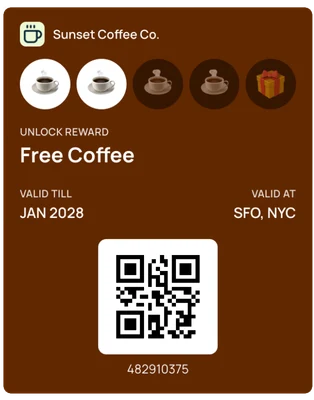
Loyalty“Create a stamp card for Sunset Coffee Co. with a free coffee after 5 stamps.”

Done! Here's your stamp card and a sign-up link for your counter.
Issue member cards from a list
Membership“Make a Jimmy Gym membership card for everyone on this list.”

Done! Each member has their own card and link.

Update one member's card
Update“Move John Davis to Gold, valid until September 2030.”
Done! John's card updates on his phone straight away.

Message everyone who saved a card
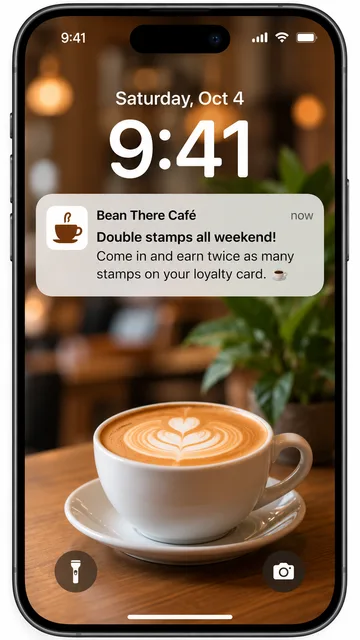
Notification“Tell everyone with the Bean There Café card: ‘Double stamps all weekend.’”
Here's the message. Send it to everyone who saved the card?
Add a stamp at the counter
Loyalty“Give Sarah a stamp on her Sunset Coffee card.”
Done! Three more stamps to her free coffee.

Check what's live
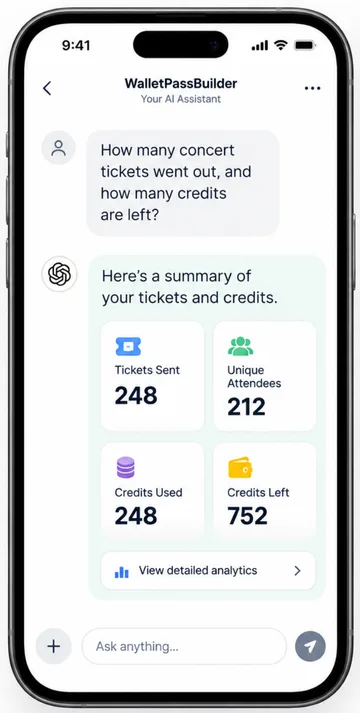
Analytics“How many concert tickets went out, and how many credits are left?”
Here's a summary of your tickets and credits.
Connect your client
Claude and ChatGPT
Both list WalletPassBuilder in their directories, so you connect it in a couple of clicks rather than by URL. See creating a pass with Claude and creating a pass with ChatGPT.
Claude Code
Run this, then start Claude and run /mcp to sign in:
claude mcp add --transport http walletpassbuilder https://walletpassbuilder.com/api/mcpCursor
Add the server to ~/.cursor/mcp.json (every project) or .cursor/mcp.json (one project). Cursor opens WalletPassBuilder to sign in the first time it connects.
{
  "mcpServers": {
    "walletpassbuilder": {
      "url": "https://walletpassbuilder.com/api/mcp"
    }
  }
}
VS Code
Open the Command Palette, run MCP: Add Server, choose HTTP and paste the server URL. VS Code asks you to sign in to WalletPassBuilder when it first connects.
Any other client
Add it as a remote MCP server over Streamable HTTP with the same URL. A client that can’t sign in with OAuth can send your API key instead, in an Authorization: Bearer header. The key is under API in the dashboard.
The 13 tools
Your assistant chooses the tool from what you ask. These are the ones the server offers:
create_passMake a pass for both wallets, a loyalty program, or one card per person, with share links.
update_passChange only what you name; every saved copy updates.
update_recipientChange one person's details, like their tier or points.
get_passA pass's design, links and recipients.
list_passesYour passes, newest first, with how many people joined.
archive_passRetire a pass: its link stops and saved copies show as expired.
send_notificationA lock-screen message to everyone who saved a pass, now or scheduled.
list_notificationsSent and scheduled messages and how they did.
cancel_notificationCancel a scheduled message.
record_loyalty_visitAdd a stamp or a purchase to a customer's card.
list_loyalty_customersWho joined a loyalty program and their progress.
get_creditsPass credits left and used.
list_workspacesYour workspaces, to work in one other than the default.
Server details
| Detail | Value |
|---|---|
| Server URL | https://walletpassbuilder.com/api/mcp |
| Transport | Streamable HTTP, remote. Nothing to install. |
| Sign-in | OAuth 2.1 with PKCE, or your API key as a Bearer token. |
| Credits | Same as the dashboard: 1 per pass created or saved to a wallet, whichever total is higher. Updates, messages and reads are free. |
Prefer code? The same actions are in the REST API.
Approvals and access
- Before a lock-screen message goes out, the assistant shows you the exact text and waits for your yes.
- It can’t see or change your billing, API key, team or password, or your loyalty customers’ phone numbers.
- Disconnect any client at any time: open API in the dashboard, then Connected apps, and click Disconnect.
Frequently asked questions
Is there an MCP server for Apple Wallet passes?+
Yes. WalletPassBuilder runs a remote MCP server at https://walletpassbuilder.com/api/mcp that creates, updates and messages Apple Wallet and Google Wallet passes.
Which clients work?+
Claude (from its Connectors Directory) and ChatGPT (from its plugin directory), on the web, desktop and mobile, plus Claude Code, Cursor, VS Code and any other client that supports remote MCP servers over Streamable HTTP.
Do I need an API key?+
No. Clients sign in with your WalletPassBuilder account through OAuth, so your API key stays private. A client that can't sign in can send the API key as a Bearer token instead.
Does it cost extra?+
No. The MCP server uses the same pass credits as the dashboard and the API: 1 per pass created or saved to a wallet, whichever total is higher. Updating cards, sending notifications and reading your passes don't use credits.
Will it message my customers without asking?+
WalletPassBuilder tells the assistant to show you the exact message and get your yes before sending, and most clients also ask for your approval before running an action.
Who on my team can connect a client?+
An account admin with access to every workspace, the same people who can manage the API key. If they leave the team, any client they connected stops working.
Sources
Apple’s newer developer pages load dynamically, so where a number comes from Apple it is taken from its Wallet Developer Guide and support pages. If Apple’s or Google’s current documentation differs, follow theirs.
- Model Context Protocol: Transports
- Model Context Protocol: Authorization
- Claude Code docs: Connect Claude Code to tools via MCP
- Cursor docs: Model Context Protocol
- VS Code docs: Add MCP servers in VS Code
More guides
- Apple Wallet enhanced event tickets: the new event ticket designWhat Apple Wallet’s enhanced, poster-style event tickets show, which iPhones support them, the semantic tags a ticket needs, and why they need NFC entry rather than a QR code.
- How to create a Google Wallet passCreate a Google Wallet pass for loyalty, memberships, tickets, coupons or gift cards: pass types, classes and objects, the Google Wallet API steps, the Add to Google Wallet button, and the no-code route.
- Klaviyo and Apple Wallet: add wallet passes to your emails and flowsConnect WalletPassBuilder to Klaviyo to put each person’s Apple Wallet and Google Wallet pass link on their profile, start flows when a pass is saved or a loyalty stamp is earned, issue passes to a list and message a segment.
- What is a wallet pass?A wallet pass is a digital card, ticket or coupon saved in Apple Wallet or Google Wallet. Learn how passes work, which types exist, what they can and can’t do, and how they compare with apps and PDFs.